


Age Changer - Future Face AI
3.919.00 Reviews
App Specs
- Version
- 5.1
- Updated On
- License
- Free
- Downloads
- 50,000+
- Developer
- UpName
- Categories
- Beauty
- Platform
- Android
Screenshots
 Analysis by AppCompare
I would treat any result from Age Changer as a playful possibility, not a forecast. The appeal is simple: take a face in a selfie and see it presented as older or younger. That single transformation is what makes the app interesting, whether you want a quick laugh with friends or a visual prompt to imagine how time might change your appearance.
Why changing apparent age is the central draw
Age Changer - Future Face AI is a free beauty app from UpName, and its focus on age transformation gives it a more specific purpose than a general photo editor. Instead of starting with color correction, retouching, or a full set of editing controls, the idea is to see a familiar face interpreted at a different age. That can make the result feel personal even when you are only using it for fun.
The effect is best understood as an image transformation, not a prediction. A generated older face cannot account for how someone will actually age, and a younger-looking result is no more a record of the past than a costume is. I find that distinction useful: it lets me enjoy the surprise without reading meaning into wrinkles, smoother skin, or other visual changes.
Making a selfie work better
For a more satisfying experiment, I would begin with a clear, front-facing photo in even light. That is practical advice for any face-focused edit: shadows, a steep angle, or hair covering part of the face can make it harder to judge what has changed. A neutral expression also gives you a steadier comparison than a photo taken mid-laugh.
I would keep one original image untouched and compare it with the altered version afterward. That makes it easier to spot what the age effect changed and what was already present in the selfie. If the first result looks odd, trying a different photo is a better test than assuming the transformation itself will suit every angle. The quality of the starting portrait has a real effect on how convincing the final image feels.
Getting Started with Age Changer
First things first, downloading and installing Age Changer - Future Face AI is a breeze. It's available on both Android and iOS platforms, and the download size is quite manageable. Once you open it, you're greeted with a clean interface that's easy to navigate. No need to spend hours figuring it out—just snap a selfie or upload a photo, and you're on your way.
The Features That Stand Out
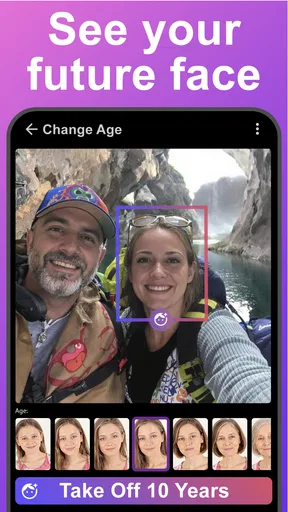
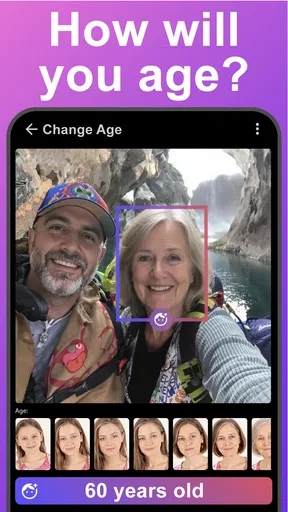
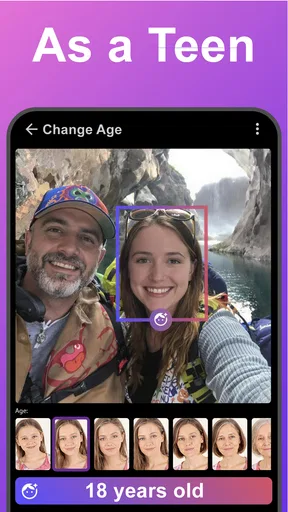
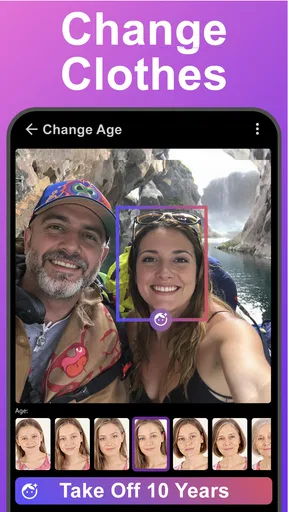
The app offers a variety of features, but the main attraction is its ability to age your face. The AI-driven technology is pretty impressive. It can transform your picture to show what you might look like in 10, 20, or even 50 years. The results are realistic enough to make you do a double-take. I tried it out with a few friends, and let's just say, we had a good laugh and a bit of a startle!
Worth Reading Before You Choose

Flipboard Shows What News Apps Must Do Beyond the Feed

Switching to Android Auto Means Rethinking Your Driving Routine

Google Calendar Makes a Crowded Week Easier to Manage

Ludo King Makes the Most of the Minutes Between Plans

Baby Panda World Brings Quick Play to Modern Phones, but Its Game Library Feels Busy

ESPN’s Live Game View Makes Following Close Games Easier
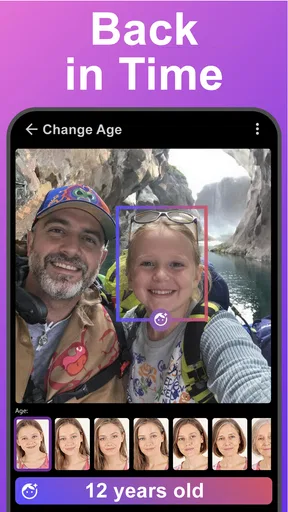
But aging isn't all this app does. You can also see yourself as a younger version, or experiment with different hairstyles and facial features. The app even allows you to add wrinkles or smooth them out, giving you a digital makeover in seconds.
User Experience and Design
One of the things I appreciate about this app is its user-friendly design. The developers have done a great job ensuring that the interface is intuitive. The tabs are clearly labeled, and the icons are self-explanatory. It's perfect for those who aren't particularly tech-savvy but want to have some fun with their photos.
Another highlight is the processing speed. Even with high-resolution images, the app doesn't lag, which is a huge plus. Nobody likes waiting around for an app to catch up, right?
Sharing and Social Integration
Once you've transformed your image, sharing it is a piece of cake. The app integrates seamlessly with popular social media platforms. Whether you want to post your future face on Instagram or send it via WhatsApp, the options are right at your fingertips. It even has a feature that allows you to compare your original and altered images side by side, which is a cool touch.
Privacy and Security
In this digital age, privacy is a big concern, and Age Changer - Future Face AI seems to take this seriously. The app clearly outlines its privacy policy, ensuring that your photos are not stored without your permission. It's a relief knowing that your images aren't floating around somewhere in the cloud without your consent.
The app does require access to your camera and photo library, which is pretty standard. However, it’s always a good idea to read through the permissions before diving in.
Where this kind of edit fits—and where it doesn’t
The most natural use is a low-stakes one: a family group chat, a birthday get-together, or a casual post where everyone understands the image is a joke. I would ask before editing someone else’s portrait, and I would label the result as an effect if it might be mistaken for a real photo. A changed face can be funny, but not everyone wants an altered image shared beyond the people who made it.
For a more useful comparison, take two or three portraits of the same person under similar lighting rather than feeding the app a random mix of selfies. This helps you see whether a striking result comes from the transformation or from differences in angle and expression. It is a small workflow choice, but it makes the experiment less misleading and gives you a better basis for choosing which version to share.
How it compares with ordinary photo editors
A standard beauty editor is usually the better choice when I want deliberate control over a portrait: adjusting the crop, refining color, or making a modest retouch. Age Changer is more appealing when the goal is specifically to see an older or younger interpretation without building the effect manually. That convenience is also its limitation; a focused transformation is not a substitute for a full editor when I want precise, natural-looking corrections.
People looking for a serious aging simulation should also keep their expectations modest. The result is an entertaining visual idea, not a dependable guide to future appearance. If I were choosing an image for an important profile or professional use, I would use the original photo or a conventional editor instead of relying on an age effect.
Practical details before you try it
The app is rated for Everyone and is listed with 10K+ installs, but that does not make every transformed image suitable for every audience. I would use my own portrait, avoid presenting an edited face as evidence of someone’s real appearance, and check the image before sharing it. These habits are especially sensible when a photo includes friends or family members who have not agreed to take part.
Age Changer is free to install, while in-app purchases range from $0.99 to $99.99 per item. I would check the purchase screen carefully before confirming anything, particularly if I am only opening the app for a quick experiment. The current version is 2.02, and the minimum operating system is 9; those details are worth checking against your device before you decide to install it.
Its average rating is 2.4 from 33 ratings, with 6 written reviews. I take that as a reason to approach it with measured expectations rather than assuming every user will have the same experience. The app suits someone who wants to test an age-changing effect and can accept a result that may be more amusing than polished. If reliable editing controls or consistently natural portraits matter more, a conventional photo editor is the safer fit.
Who will get the most out of it
I think the best audience is curious, casual users who enjoy seeing familiar faces transformed and do not need the image to be realistic in a scientific sense. It can also work as a conversation starter: at a relaxed family gathering, I could take a group selfie, try the effect on one willing participant, and let everyone decide whether the result feels recognizable. That makes the app a small shared activity rather than a tool for serious beauty work.
By contrast, I would skip it if you want a precise forecast, professional portrait retouching, or a dependable way to preserve a person’s real appearance. I would also avoid using it on someone else’s photo without their consent. The age effect is most enjoyable when the person in the picture knows what is happening and the edited result stays clearly in the realm of play.
Final Thoughts
All in all, Age Changer - Future Face AI is a fun and engaging app. Whether you're looking to kill some time, prank your friends, or genuinely see what the future holds for your appearance, this app delivers. It's not just about aging; it's a complete package that offers a suite of facial transformation tools. Just remember, the future may not be set in stone, but with this app, you can at least get a sneak peek!
If you're curious and ready for a laugh (or maybe a scare), give it a try. You might find yourself spending more time than you expected exploring all the possibilities.
Pros
- Realistic aging effects and transformations.
- User-friendly interface with intuitive controls.
- Fast processing with minimal loading time.
- Offers a variety of photo editing tools.
- Compatible with both selfies and portraits.
Cons
- Contains in-app purchases for premium features.
- May require internet for full functionality.
- Some effects can appear exaggerated.
- Ads can be intrusive and frequent.
- Limited free version features.
FAQs for Age Changer - Future Face AI
What features does Age Changer - Future Face AI offer?
Age Changer - Future Face AI provides a variety of features, including the ability to simulate your appearance as you age, predict future looks, and apply various filters. It uses advanced AI technology to generate realistic transformations, offering both fun and insightful glimpses into potential future appearances.
Is Age Changer - Future Face AI safe to use?
Yes, Age Changer - Future Face AI is designed with user privacy in mind. The app ensures that your photos and data are securely processed and not stored on servers, maintaining confidentiality. However, it's always recommended to review privacy policies and permissions before using any app.
How accurate are the predictions made by the app?
The predictions made by Age Changer - Future Face AI are based on advanced AI algorithms that analyze facial features. While the app offers realistic transformations, it should be used primarily for entertainment purposes. Actual aging can be influenced by numerous factors, including lifestyle and genetics, which the app cannot predict.
Are there any in-app purchases or subscriptions required?
Age Changer - Future Face AI offers a free version with basic features. However, to access premium filters and ad-free usage, users may need to make in-app purchases or subscribe to a premium plan. These options enhance the app's functionality and user experience.
Can Age Changer - Future Face AI be used on both Android and iOS devices?
Yes, Age Changer - Future Face AI is available for both Android and iOS platforms. Users can download it from the Google Play Store or the Apple App Store, ensuring a wide range of device compatibility and accessibility for users across different operating systems.


